Workframe

Interactive scenarios for behavioural research

Put behaviour
in the frame.

Turn your vignette into a situation participants experience.
Build it visually. Run it inside your survey.

From vignette to experience

A situation. A decision.
A data point.

The same research question. A different way to ask it.

Illustrative participant playback

An illustrative playback. The timeline holds at the choice, then follows the selected branch.

Give the question
a world to live in.

A room. A colleague. A conversation that asks something of you. Your participant enters the situation you designed.

You choose the setting, the cast, the dialogue, and when each moment happens.

Then let the
participant decide.

The scene pauses at a choice. What happens next can depend on their answer, their condition, or an earlier event.

Watch the playhead hold at the interaction, then continue into the selected branch.

Keep the moment.
Get the measure.

Choices, timings, and signals become a dataset, joined to the identifiers your survey already uses.

One row per run, with a timestamped event log when you need the detail.

You know the study.
Now direct the scene.

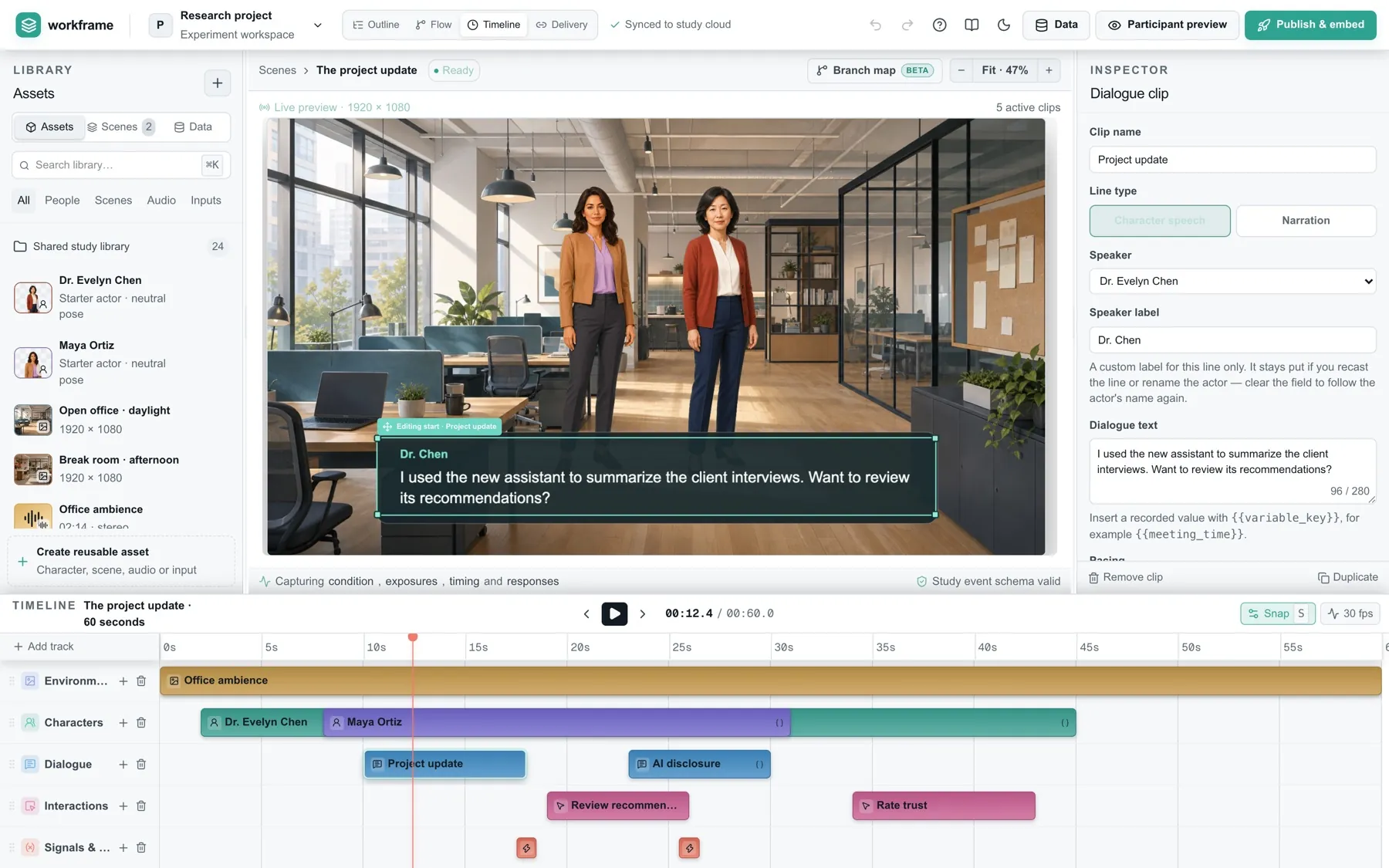
Arrange the setting, cast, dialogue, and decisions on a visual timeline. See the whole path before a participant does.

Build it visually

Drag and drop

Pick a setting, put characters in it, write what they say and what you want to ask, then lay it all out on the timeline. What you arrange is what your participants get.

Pieces Scene timeline Character Dialogue Choice Signal Environment Characters Dialogue Choice Character Dialogue Choice

Import a first draft with AI

Included

Hand your script and our preparation guide to whichever AI you use. Drop the study file it returns into Workframe, read it over, and carry on editing by hand.

1Start with your scriptDialogue, conditions and choices
2Give it to your AIUse Workframe’s preparation guide
3Open the draft in WorkframeReview, adjust and preview before publishing
Workframe’s visual editor with the participant scene above five timeline tracks.

Build visually. Place clips on five tracks. Preview the scenario as you work.

Already have a script? Use your AI with our preparation guide, import the study file, then review and refine.

Read the authoring guide

Your setting.
Your cast. Your study.

Start with the included library, or bring your own photographs and characters. The stimulus stays in your hands.

Drop in your own file, place it on the stage

Sources up to 40 MB. Workframe resizes and converts on the way in, or keeps your original pixels if you would rather it did not.

Placed on the timeline like anything else, so the same actor can enter in one condition and never appear in the other.

Saved to your account library 500 MB and 1,000 files Replace a source later and every clip already using it follows.

PNG, JPG, or WebP. Upload once, reuse across studies.

Media sizes and storage

Sources up to 40 MB. Your account library holds 500 MB and up to 1,000 files. Workframe can resize and convert on upload, or keep your original pixels. Replace a source and clips using it follow.

Inside your existing workflow

One richer moment.
The same survey.

Keep consent, randomisation, and survey items where they are. Embed the scenario as one step in your questionnaire.

Copy the snippet, paste it into a question

Workframe writes the snippet. The two values in it are your survey’s own fields.

Nothing else in the questionnaire changes, and Next waits for the scene.

Qualtrics

Copy the setup Workframe generates. Answers save as embedded data, and Next waits until the scenario finishes.

Recruiting with Prolific?

Participant and session IDs travel into your export, ready to match with the submissions you already have.

Using another survey platform?

The scenario can run anywhere a page can be embedded. Automatic answer-saving depends on the host. Other platforms are not yet tested by us; pilot the complete flow before collecting data.

The experience ends.
The evidence stays.

Download your complete dataset as CSV or JSON. Keep the choices, conditions, timings, and IDs together.

Download an example CSV
From participants to files · Illustrative data
Workframe participants.csv one row per person events.csv every moment, timed
idconditionchoicetrusttime P01disclosureflag_now63m04s P02controlwait32m31s P03disclosureflag_now53m24s P04control--0m41s
Download spreadsheet Advanced export Complete every time, with no row cap.

A fixed version.

Publishing freezes the study. Every run records its version, so you can cite what participants actually saw.

A traceable record.

Participant summaries and detailed event timelines. Integrity checks flag missing fields.

A clean starting point.

Test runs stay out by default. Survey identifiers pass through as given; missing IDs stay empty.

Room to experiment.
Before you commit.

Draft for free. Publishing is free throughout the pilot. After that, pay once per published study, with revisions included.

Draft

Free
No time limit
  • Unlimited draft studies
  • AI-assisted script import, included
  • Every authoring feature: scenes, dialogue, choices and branching
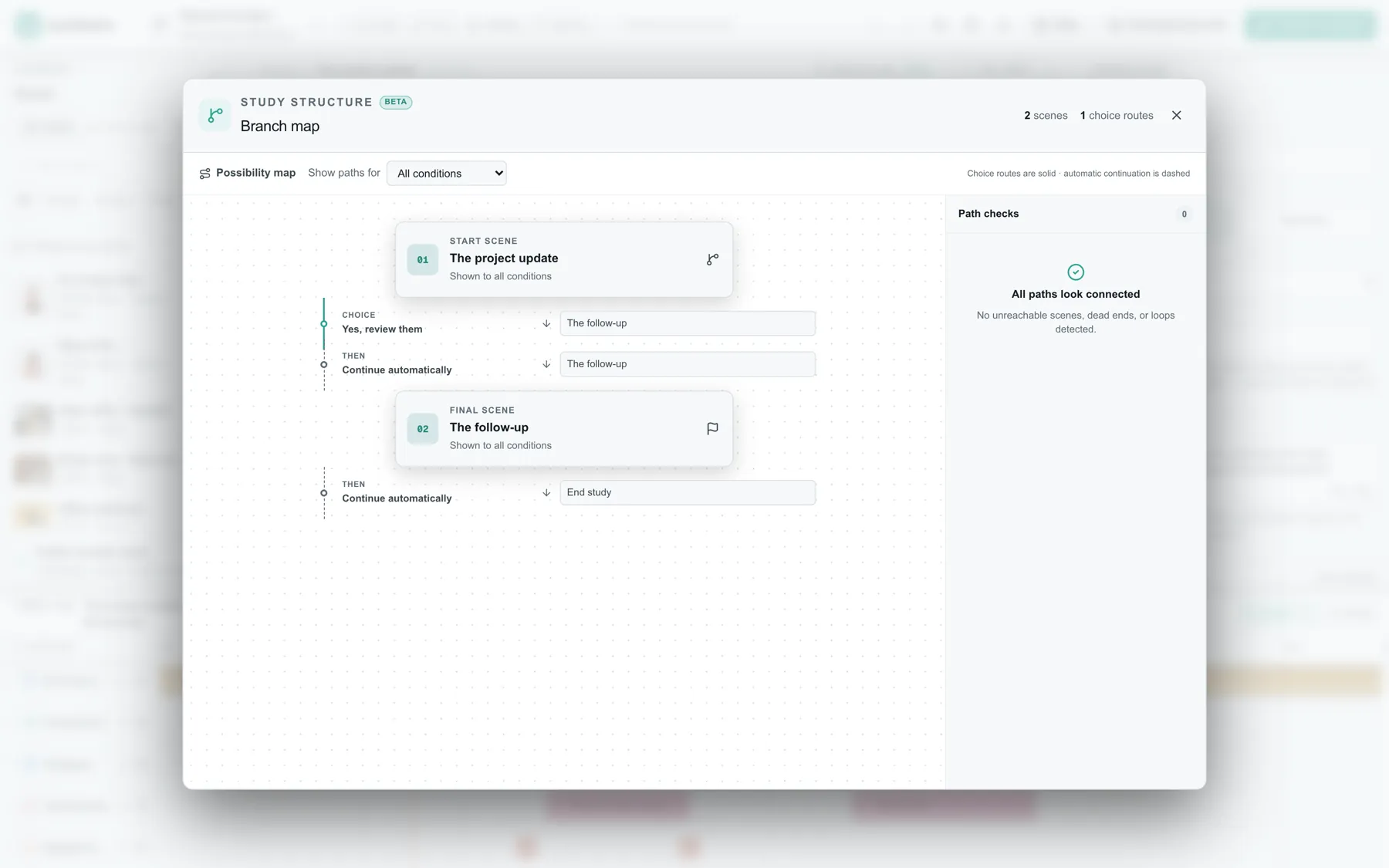
  • Branch map and path checks
  • Preview and test runs
  • No participant sessions. A draft cannot collect real data.
Request pilot access

Published study

Free during the pilot
A one-time fee per study applies after the pilot.
  • Everything in Draft
  • Keep numbered, reproducible versions
  • Unlimited participant sessions and events
  • Republish as often as you need; revisions never cost again
  • Download the complete results with no row cap
  • Participant summaries, detailed timelines and integrity checks
  • Data stays exportable after collection ends
Request pilot access

Billing is not switched on during the pilot, and we will tell you before that changes.

Not available yet
  • Shared lab workspaces. Several researchers on one set of studies, with per-person access. Today a study belongs to one account, and sharing means sharing a login, which we do not recommend.
  • Institutional agreements. A departmental or university-wide arrangement with your own single sign-on and a signed data processing agreement, invoiced annually rather than per study.

Both are on the list. We are not putting dates on them, because a date we miss is worse than no date at all. If either one would settle it for your group, say so in your access request; what we hear shapes the order we build in.

Ready for the questions
your ethics board will ask.

Data handling, access, retention, and deletion, documented so your team can make an informed decision.

Participants never create an account

They open the study, complete the scenario, and leave. Any session token is stored scrambled and expires.

Two subprocessors, both named

The complete list of third parties that process your data on our behalf:

  • Cloudflare, Inc. Edge compute (Workers), study database (D1) and media storage (R2). United States / global edge.
  • Clerk, Inc. Researcher sign-in and account identity: the email address a researcher signs in with, and the session that keeps them signed in. Scope is the authoring surface only. The participant hostname never calls Clerk, so no participant or study data reaches it. United States.

There are no others. No analytics, email, advertising or tracking vendor touches participant data. We will notify pilot accounts before this list ever changes.

What we store about participants

Responses, event sequences, timing, and the identifiers your survey or recruitment tool passes in. Those identifiers (a Qualtrics response ID, a Prolific PID) are stored as given and appear in your export, because joining a run to your survey data and approving payment is what they are for. Separately we derive a one-way participant key from them, which is what detects repeat attempts. Workframe never asks a participant for a name, an email address or an account, and never receives one unless your own survey passes it into one of those identifier fields, so pass in a study-scoped ID, not a direct identifier.

Only your account can see your studies

Access to a project and its results is limited to the account that owns it. Researcher sign-in is handled by Clerk; every authoring request is independently verified server-side before it reaches project data. Everything runs on Cloudflare's infrastructure, so your study data and uploaded media sit with a single provider; we will supply the signed hosting and durability details on request.

Full export, any time

Your dataset is downloadable as CSV or JSON at any time, in full, with no row cap and no request needed.

Deletion is immediate and irreversible

From your account you can delete a single study and its collected data, or delete your entire account and everything in it.

No trackers on the participant surface

No advertising or marketing use of participant data. No selling or sharing with third parties. No tracking pixels or third-party analytics on the participant surface: an iframe inside your survey should not carry anyone else's beacons.

Workframe is a data processor for the participant data you collect. You remain the controller and the person your IRB approved. The full documents: Privacy Notice, Data Processing Agreement, Subprocessors and Cookies and storage.

A few labs at a time

Let’s put your
study in motion.

Tell us what you want to run. We’re opening pilot access by invitation, with direct help from the people building Workframe.

No self-serve signup yet. We reply personally, usually within two working days.

hello@workframeapp.com

A person replies, usually within two working days, including when the answer is not yet.

A few things
worth knowing.

Do I have to use Qualtrics?

No, but it is the path we support best. Workframe gives you the setup pieces to paste into Qualtrics, stores the recorded answers there, and keeps the survey from moving on before the scenario finishes. Other survey tools can show the scenario too, but automatic answer-saving depends on what that platform supports.

Do I need to know how to code?

No. Building, publishing and reading results all happen in the browser. Survey setup is copy and paste: Workframe prepares what Qualtrics needs, and you do not edit it.

Does Workframe replace my survey platform?

No. Your platform keeps consent, the survey items, randomisation and payment. Workframe is one step inside that survey, the step where the scenario plays. We haven't built survey items, panels or analysis, and we don't plan to.

Can I cite a specific version in a paper?

Yes, and it means you can cite the stimulus itself instead of describing it. Every published version keeps a stable identifier, and that identifier is what your placement URL points at, so a replicator runs exactly what your participants ran. Quote it in your methods section.

What happens if I edit a study while it is collecting data?

Nothing, for participants already running: they are on a frozen published version. Your edits sit in the draft until you publish again, which creates a new numbered version. Each run records the version it was on.

How do participants get randomised into conditions?

Upstream, in your survey, by whatever mechanism you already trust. Workframe reads the condition and assignment values your survey passes in and shows the content whose rules match. Your randomisation stays exactly where it is.

Is it priced per study or per participant?

Per study, once. Whether it collects 40 responses or 4,000, the fee is the same, and republishing a revision never costs again. A new study means a new project, with its own participants, dataset and results page. Drafts are free; you only pay at the moment you publish, and published data stays exportable.

Does it work on a phone?

The scenario renders on a fixed 1920 × 1080 stage that scales to fit, so it displays and it works. It hasn't been optimised for small screens, and dense dialogue is harder to read there. If a chunk of your sample will complete on a phone, pilot it on one first. The authoring tool is desktop-only.

Is my data backed up, and how long do you keep it?

Collected data is retained for as long as your study exists, on managed Cloudflare infrastructure with their durability guarantees. It is not a substitute for your own archive: export a copy at the end of collection.

What do I do if something breaks mid-study?

Email us. During the pilot you are writing to the people who built it, and a study that is live with real participants goes to the front of the queue.